Online Shop & E-Commerce

Sell Online Without the Complexity

Add a fully functional online shop to your Krubly website. Manage products, take payments, track orders, and follow up with customers — all from one dashboard.

Selling online shouldn't require three platforms and a developer

The typical small business e-commerce setup: a website on one platform, products managed somewhere else, payments through a separate tool, and orders landing in an inbox that nobody checks consistently.

Every sale requires touching at least four systems. Every customer record lives somewhere different. Every integration is one more thing that can break.

Krubly puts your shop, your products, your payments, and your customer relationships in one place — so you can focus on your business, not on managing the tools that are supposed to help you run it.

Everything your online shop needs

Product management
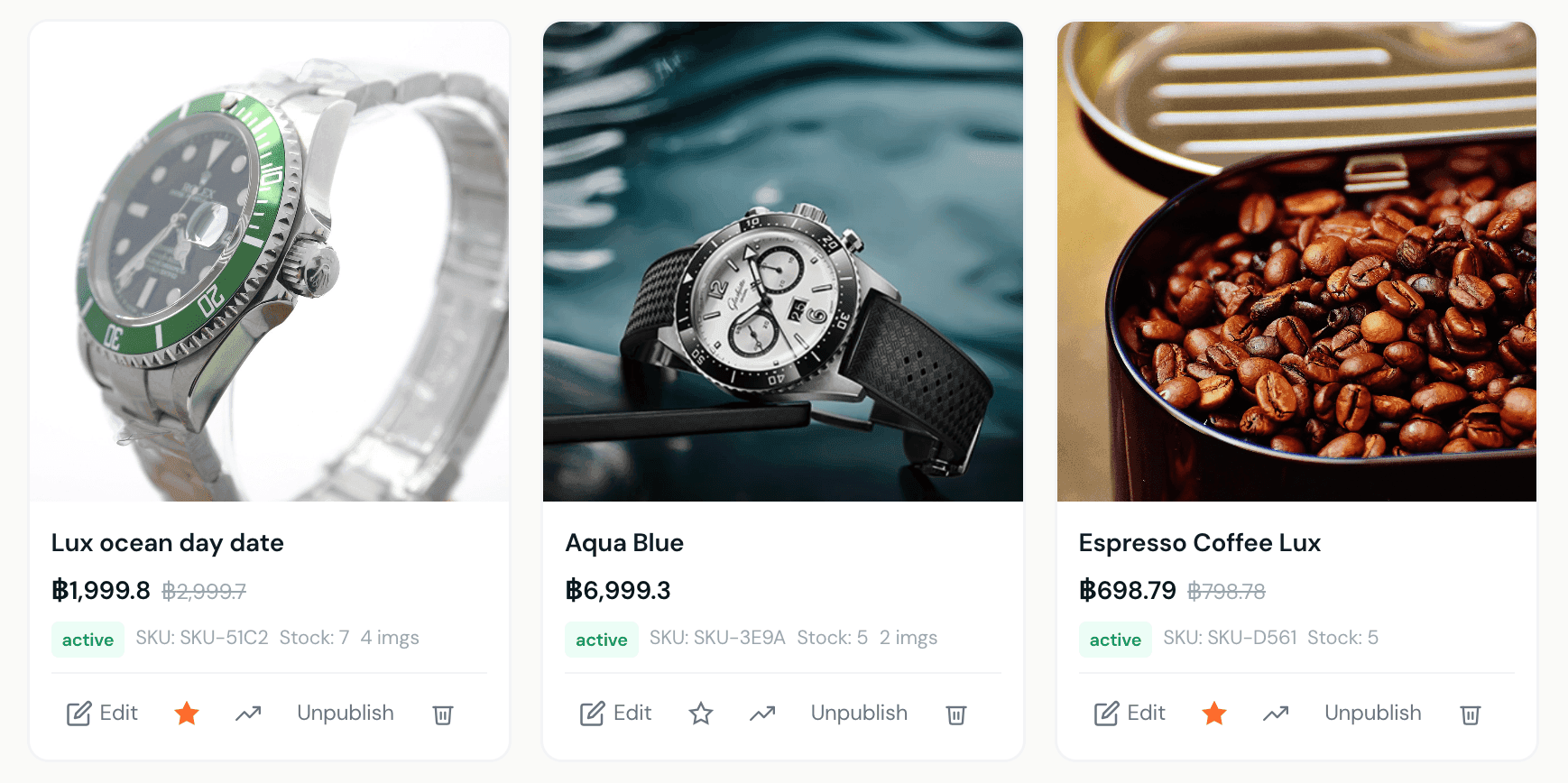
Add products with everything your customers need to decide: name, description (with formatting), price, compare-at price for sale items, multiple images with drag-to-reorder, video links, stock tracking, SKU, and full SEO fields so your products get found on Google. Organise everything into categories with subcategories. Set a display order — featured first, newest, by price, or alphabetical.
Multiple payment options
Accept payments the way your customers want to pay:
  • Stripe — card payments via Stripe Connect, with a full payouts dashboard built directly into your Krubly account. Available on Pro and Agency plans.
  • PromptPay — Thailand's mobile payment system. Add your PromptPay ID and every order confirmation email automatically includes a QR code for the exact amount. You mark orders as paid when payment arrives.
  • PayPal — for international customers.
Order management
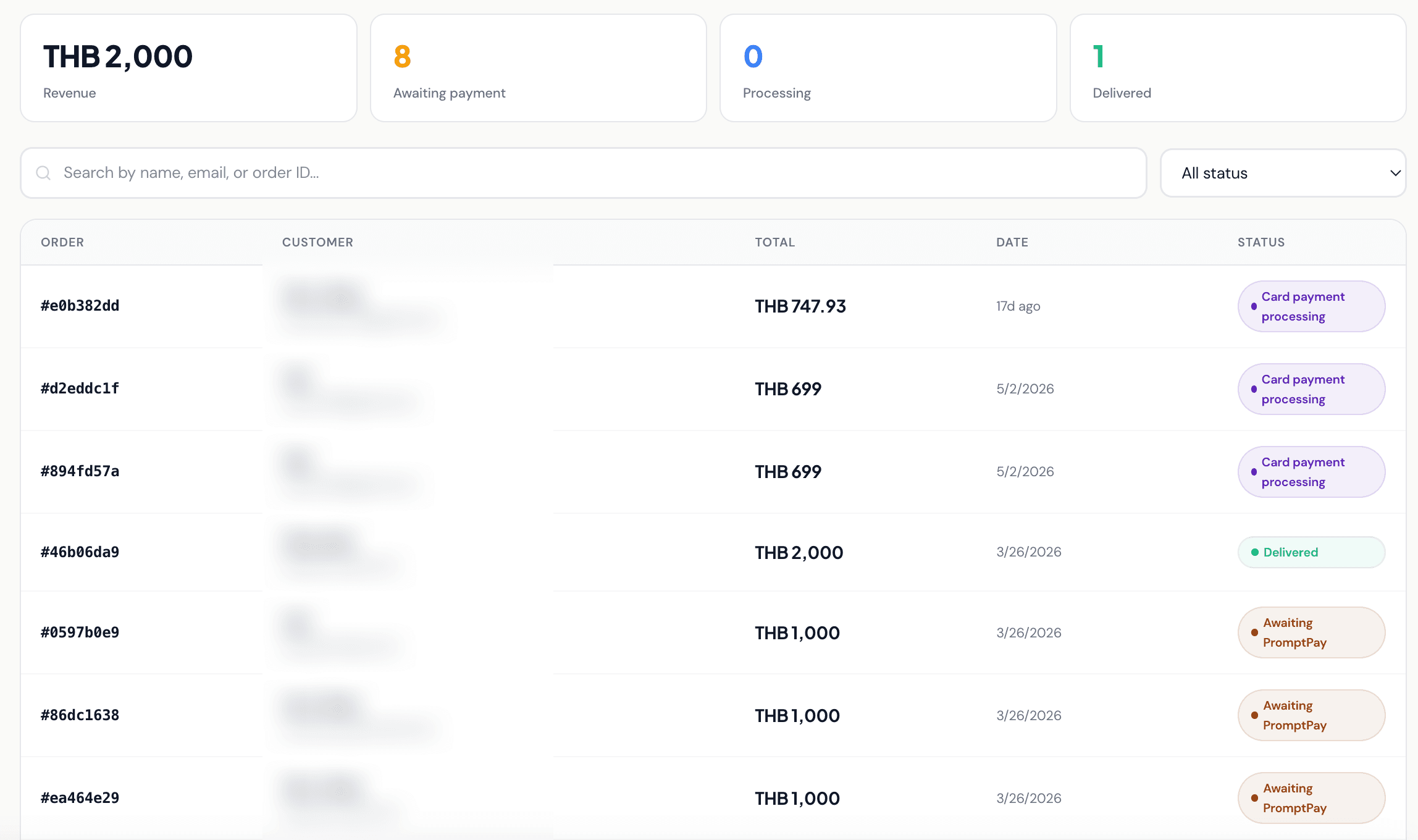
Every order has a full lifecycle: Submitted → Confirmed → Processing → Shipped → Delivered, plus Awaiting Payment, Cancelled, and Refunded states. See revenue, pending orders, and delivery status at a glance. Every order automatically creates a customer record in your CRM.
Discount codes
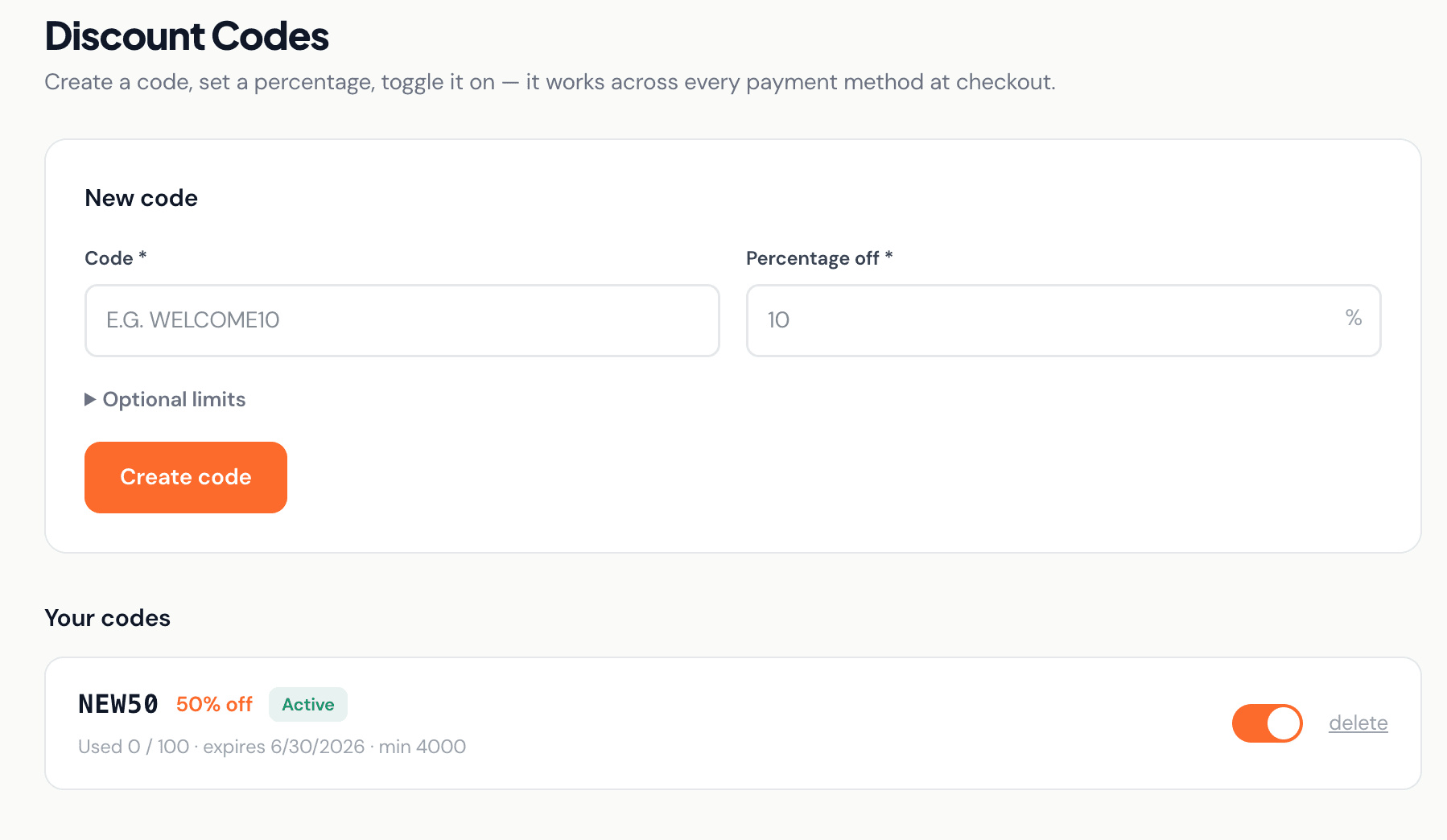
Create promotional codes with percentage discounts, optional expiry dates, usage limits, minimum order values, and one-use-per-customer rules. Track how many times each code has been used.
Upsells
Flag any product as an upsell and it appears in the cart as a “You might also like” suggestion — increasing average order value without any extra configuration.
Shipping
Set shipping rates that apply automatically at checkout. Server-side order validation means prices and totals are always calculated correctly — customers can't manipulate pricing.
Krubly shop product management with images, pricing and stock tracking
Add products with images, pricing, compare-at price, stock tracking and SKUs
Krubly order management dashboard with PromptPay and card payment status
Full order lifecycle — PromptPay, card payments and delivery status in one view
Krubly discount code creator with percentage off and usage limits
Create codes with expiry dates, usage limits and minimum order values

Your shop and your CRM — one system

Every customer who places an order is automatically added to your CRM. You can see their purchase history alongside any enquiries they've made. When they contact you again, you have the full context of their relationship with your business — not just a transaction record.

Your product catalogue also powers your website's shop section automatically. Add a product in your dashboard and it appears on your site instantly.

Perfect for small businesses selling products in Thailand and Southeast Asia

Whether you're a boutique selling fashion, a food brand, a wellness brand, a craft business, or any retailer wanting to sell online — Krubly's shop is designed for businesses that don't have a dedicated e-commerce team.

PromptPay integration means Thai customers can pay instantly via QR code without needing a credit card. Stripe means international customers can pay by card. Both payment methods work side by side.

Ready to start selling online?

Your shop, your products, your payments, and your customer records — all in one place, from day one.

Frequently asked questions

How do I accept payments on my Krubly shop?
Krubly supports three payment methods: Stripe (card payments, Pro/Agency plans), PromptPay QR code (all plans, generates automatically in order confirmation emails), and PayPal (all plans). You can use any combination.
Do I need a Stripe account?
For card payments via Stripe, yes — you connect your Stripe account through Krubly's payments dashboard. PromptPay and PayPal don't require Stripe.
How does PromptPay work?
Add your PromptPay ID in your settings. Every time a customer places an order, their confirmation email includes a PromptPay QR code for the exact amount. When payment arrives in your bank, you mark the order as paid in your dashboard.
Is there a transaction fee?
Stripe's standard processing fees apply to card payments. PromptPay and PayPal fees are determined by your bank and PayPal account respectively. Krubly does not add additional transaction fees on top of the payment processor's rates.
Can I manage stock levels?
Yes — enable stock tracking per product and Krubly will track quantity and prevent overselling.
Do my products appear on my website automatically?
Yes. Your product catalogue powers your website's shop section. Add or update a product in your dashboard and it reflects on your live site immediately.